Short answer
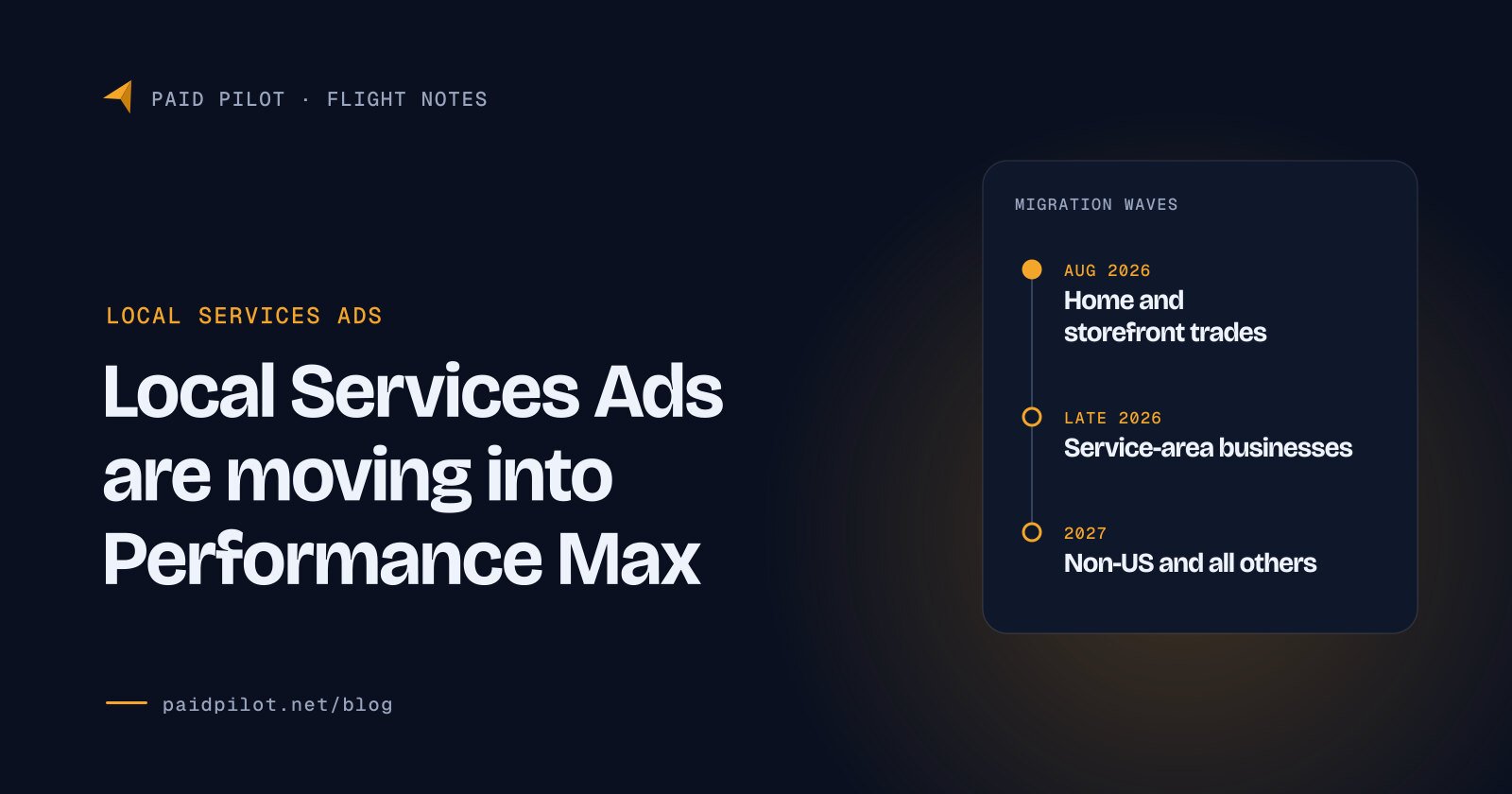
The Local Services Ads Performance Max migration moves every Local Services Ads account into Google Ads as a Performance Max campaign with pay-per-lead goals. Select US home and storefront trades moved first in August 2026, service-area businesses follow in late 2026, and everyone else in 2027.
You still pay only for valid leads and still show only on Search and Maps. What changes: weekly budgets become daily, manual bids go away, and old performance reports do not transfer, so download them before your account moves.
Key takeaways
- The billing model stays pay per lead. Google says “You still only pay for valid leads (such as phone calls and messages)” after the move (Google Ads Help).
- Your weekly budget becomes a daily one. Google divides your historical average weekly budget by 7, and monthly spend is capped at the daily budget times 30.4 (Google Ads Help).
- Manual bidding ends. Maximum cost per lead bids and category level Target CPA go away; campaigns default to Maximize Conversions, and Google suggests Target CPA only above 15 leads a month (Google Ads Help).
- Old performance reports do not move. Lead history transfers, but Local Services Ads performance reports do not, so download them before your date (Google Ads Help).
- The placement is worth protecting. In a WebFX study of 500 US home services searches in May 2026, Local Services Ads appeared on about 28% and took the top position every time they appeared (WebFX).
What is the Local Services Ads Performance Max migration?
Local Services Ads (LSAs) are Google’s pay-per-lead ads for local service businesses: they appear at the top of results with your reviews, hours and a verification badge, and you pay when a customer contacts you. Until now they lived in a separate Local Services dashboard. Google is retiring that standalone setup and rebuilding each account as a Performance Max campaign with pay-per-lead goals inside Google Ads (Search Engine Land, 20 July 2026).
Performance Max with pay-per-lead goals is a keywordless Google Ads campaign type that charges you when a customer calls, messages or books, not when someone clicks. Google says these ads appear “in Google Search and Google Maps results when customers are actively searching for your services” in your service area (Google Ads Help). Search Engine Land reports that these campaigns “do not expand to Google’s other advertising channels” (Search Engine Land).
When will my Local Services Ads account move?
Google assigns each account its own date and emails you 14 days before the move, then again 7 days before (Google Ads Help). These are the waves Google has published so far.
Google announces that Local Services Ads are moving into Google Ads as Performance Max campaigns with pay-per-lead goals (Search Engine Journal, 20 July 2026).
First wave: select US home and storefront service advertisers, including plumbing, HVAC, electrical, appliance repair, house cleaning, lawn care, roofing, pest control and moving (Google Ads Help).
Bookings become an optional chargeable lead type alongside required phone calls and optional messages (Google Ads Help).
Broader groups, including service-area businesses without physical storefronts and accounts with custom bidding or booking configurations (Google Ads Help).
Non-US accounts and all remaining business categories (Google Ads Help).
Trade press also listed pet care, wellness and education businesses in the first wave (Search Engine Land), and Google’s supported verticals list includes them (Google Ads Help). Service-area businesses with no storefront are scheduled for late 2026 unless your notice email says otherwise.
What stays the same after the move?
- Pay per lead. “You still only pay for valid leads (such as phone calls and messages)” (Google Ads Help).
- Where you show. Google Search and Google Maps (Google Ads Help).
- No keywords to manage. Campaigns stay keywordless and use information from your Google Business Profile (Search Engine Land).
- Your lead history. Past leads “will automatically transfer to Google Ads and remain fully accessible” (Google Ads Help).
- Budgets, settings and creative assets. These transfer automatically (Search Engine Land).
- The badge. Eligible businesses in select verticals can display the Google Verified badge after verification checks (Google Ads Help).
What changes in budgets, bidding and reports?
| Setting | Local Services dashboard | Performance Max with pay-per-lead goals |
|---|---|---|
| Budget | Average weekly budget | Average daily budget (weekly budget ÷ 7) |
| Monthly ceiling | Weekly budget × typical weeks per month | Daily budget × 30.4 |
| Bidding | Manual bids allowed, such as a maximum cost per lead | Maximize Conversions by default, Target CPA optional |
| Target CPA | Set by service category | One campaign-level Target CPA |
| BBB callout | Supported | Removed; choose at least 6 other callouts |
| Lead inbox | Local Services inbox | Leads page in Google Ads |
| Performance reports | In the dashboard | Do not transfer; download before the move |
Sources: Google Ads Help, Local Services Help, Search Engine Journal.
Budgets: weekly becomes daily
“Your historical average weekly budget is automatically divided by 7 to determine your daily average budget,” and monthly spend is capped at the daily budget times 30.4 (Google Ads Help). In the old setup, your monthly maximum was your average weekly budget times the typical number of weeks in a month (Local Services Help). Here is how that works on an illustrative budget.
$350
average weekly budget
7
days
$50
average daily budget
At $50 a day, the monthly ceiling is $1,520 (our arithmetic: $50 × 30.4). Across Google Ads campaigns in general, a single day “might spend up to twice your average daily budget” while the month stays within 30.4 times it (Google Ads Help), so plan cash flow on the monthly ceiling, not on any single day.
Bidding: no more manual bids
“Manual bidding (such as setting a maximum cost-per-lead) is no longer supported,” and industry-level Target CPA is retired (Search Engine Roundtable, 21 July 2026). Instead, “a unified campaign-level Target CPA will be calculated and applied to all vertical categories” (Google Ads Help). Bidding defaults to Maximize Conversions, which Google says uses “Google AI to set bids dynamically, helping you get the most leads possible within your daily budget” (Google Ads Help).
That matters if your categories have different lead values: a drain cleaning call and a water heater replacement call may be worth very different amounts, yet one Target CPA now covers both. Google suggests moving to Target CPA only with “more than 15 leads per month” (Google Ads Help), and Target CPA is an average: “Some conversions may cost more than your target and some may cost less” (Google Ads Help).
Reports: save them before your date
“Your Local Services Ads performance reports will not transition to Google Ads,” though Google offers a page to download historical reports before your migration (Google Ads Help). Your lead records move. The month by month and category by category performance view you need for year-over-year comparisons does not.
Callouts and the Google Verified badge
“BBB callouts are no longer supported,” and Google asks you to select “at least 6 other structured callouts” (Google Ads Help). Its best practices allow “up to 6 callouts per business category” and “up to 100 additional custom photos” (Google Ads Help). The badge changed a year earlier: in October 2025, Google Verified replaced Google Guaranteed, Google Screened and License Verified by Google, and the Money Back Guarantee was discontinued (Google blog, 20 August 2025; Local Services Help). You still need “a verified, active Google Business Profile” to run these campaigns (Google Ads Help).
How much do Local Services Ads leads cost?
Google does not publish a price list. “Lead prices may vary depending on your location, the job type, the type of lead, or your bidding mode,” and message leads usually cost less than phone leads (Local Services Help). After the move you still pay per valid lead, and for calls “You are only charged for valid, qualified phone leads that meet minimum call duration requirements” (Google Ads Help). For a yardstick, here is what regular Search ads cost in LocaliQ’s 2026 benchmarks, which come from its own customers’ campaigns.
$66.69
average cost per lead, Search ads, all industries
$90.92
average cost per lead, home and home improvement
$8.33
average cost per click, home and home improvement
Source: LocaliQ, 2026 Search Advertising Benchmarks, published 1 June 2026. Search campaign data, not Local Services Ads prices.
If a pay-per-lead campaign books jobs for less than your Search campaigns do, it is earning its budget. Track booked jobs, not just leads, because a cheap lead that never books is not cheap. See our Google Ads cost guide and the budget, CPA and ROAS calculator.
Why does the Local Services Ads spot matter for home services?
Because it sits at the very top of the page when it shows. WebFX, a marketing agency, searched 100 US home services keywords five times each in May 2026 (500 searches). Local Services Ads appeared on 142 of the 500 searches, about 28%, and “took the top position every time” they appeared. Traditional Google Search ads appeared on 42 of 500, about 8% (WebFX, 8 July 2026). This is WebFX’s own published study, run before the migration began.
How often Local Services Ads appeared, by trade
Share of US home services searches showing Local Services Ads, May 2026 (100 searches per trade)
- All five trades, about 28%
See the data
| Item | Value |
|---|---|
| Garage doors | 36% |
| Plumbing | 32% |
| HVAC | 28% |
| Electrical | 25% |
| Roofing | 21% |
Local Services Ads vs Google Search ads: how often each appeared
Share of US home services searches, May 2026, WebFX study of 500 searches
- Local Services Ads
- Google Search ads
See the data
| Item | Local Services Ads | Google Search ads |
|---|---|---|
| Garage doors | 36% | 12% |
| Plumbing | 32% | 7% |
| HVAC | 28% | 10% |
| Electrical | 25% | 7% |
| Roofing | 21% | 6% |
City-specific searches triggered Local Services Ads at “nearly double the rate of generic queries, roughly 49% versus 25%” in the same study (WebFX). In our view, a placement this valuable is worth managing through a bumpy first month rather than pausing.
What should you do before your account moves?
Search Engine Journal’s advice is blunt: “at least one part of your account history does not transfer, so the only window to save it is before your account moves” (Search Engine Journal, 25 August 2026). Work through this list as soon as you can.
- Download your performance reports. Save at least 12 months, by month and by category, because these reports do not transfer (Google Ads Help).
- Write down your current budget and bids. Note your weekly budget, any maximum cost per lead and any category-level Target CPA, so you can compare after the move.
- Record cost per lead and booked rate by category. Pull leads, charged leads, booked jobs and revenue per category from your own records or CRM. This is your baseline.
- Tidy your Google Business Profile. Categories and service areas are pulled from your profile (Google Ads Help), and you need a verified, active profile to keep serving (Google Ads Help).
- Replace the BBB callout. Choose at least 6 structured callouts that describe what makes you different (Google Ads Help).
- Watch for the 14-day email. It sets your migration date; a reminder follows 7 days before (Google Ads Help).
- Sort out access. Make sure the right people can log in to the Google Ads account the campaign will live in, and that your business, not a vendor, owns that account.
What should you check in the first 30 days after the move?
- Confirm the daily budget. It should equal your old weekly budget divided by 7, and the monthly ceiling (daily budget times 30.4) should fit your plan (Google Ads Help).
- Review service types. Google requires at least one service type for every active business category (Google Ads Help). Turn off jobs you do not want.
- Check the service area. Google advises against service area boundaries “more than two hours of driving time” from your business (Google Ads Help). Remove ZIP codes you will not drive to.
- Set the ad schedule. It defaults to “All the time”, and you can sync it to your business hours (Google Ads Help). Sync only if calls outside hours would go unanswered.
- Decide on Direct Business Search. When it is on, “you are only charged for leads from new customers” who search your business name (Google Ads Help).
- Work the Leads page daily. It shows each lead with a Charge Status column and call recordings, and lets you mark leads as Booked or Completed (Google Ads Help).
- Answer the phone. Google’s best practices list answering calls promptly, reducing missed calls, returning missed calls quickly and keeping reviews above four stars (Google Ads Help).
- Compare against your baseline after four weeks. Use the reports you saved. In our experience, automated bidding is noisy in its first weeks, so judge on booked jobs over a full month, not on a single slow week.
What problems have advertisers reported so far?
Two issues have surfaced since the rollout began. On 1 September 2026, Search Engine Roundtable reported Local Services Ads being unlinked from Google Business Profiles and access errors around the data download deadline. Google’s Ads Liaison said “We identified a bug and are actively working to resolve it” and that it was “unrelated to the migration” (Search Engine Roundtable).
On 1 October 2026, the same site reported legal Local Services Ads in Fresno, California showing firms based in other states. Google’s response was “Confirming that this is working as intended,” because those firms serve customers seeking that service in the area (Search Engine Roundtable).
Check your lead list for out-of-area or off-target contacts and confirm your profile is still linked. Google says charged leads “get reassessed by our models over time, and may be issued credits automatically if determined to be low quality,” with automatic credits available in the US and Canada (Local Services Help).
Should you run Google Search ads alongside Local Services Ads?
Often yes, because the two do different jobs. Pay-per-lead campaigns stay keywordless: Google matches you to searches from your profile, categories and service types, and you pay per lead (Google Ads Help). A Google Search campaign lets you choose keywords, write your own ads, add negative keywords and send people to a landing page for a specific job, such as emergency repairs. Track both by booked jobs and move budget toward whichever brings in profitable work.
How Paid Pilot handles the move
We manage Local Services Ads and Search together for home service businesses, inside a Google Ads account that you own, with no contract. Before your migration date we save the reports Google will not move and set a cost per lead baseline by category; after it, we check budgets, service types, schedules and charged leads every week. See our Local Services Ads management, the home services page and pricing, or ask for a free recorded audit of your account before it moves.
Frequently asked questions
No. The ads, the pay-per-lead billing and the placement on Google Search and Maps stay. What goes away is the separate Local Services dashboard: each account becomes a Performance Max campaign with pay-per-lead goals inside Google Ads, in waves from August 2026 through 2027.
Google has not announced a price change. You still pay per valid lead, and prices still depend on location, job type, lead type and bidding. Bidding is what can shift your costs: manual bids end, and one Target CPA covers every category. Compare cost per lead with a saved baseline.
Download your performance reports, because they do not transfer to Google Ads. Note your current budget and bids, update your Google Business Profile, and choose at least six structured callouts to replace the BBB callout. Google emails you 14 days and 7 days before your account moves.
Google reassesses charged leads with its models and may credit low quality leads automatically in the US and Canada. The new Leads page shows a Charge Status for each lead. Keep notes on bad leads so you can raise them with Google Ads support if a credit does not appear.
In October 2025 Google replaced Google Guaranteed, Google Screened and License Verified by Google with one Google Verified badge and discontinued the Money Back Guarantee. Eligible businesses in select categories can display Google Verified after their account moves into Google Ads.
Google’s schedule puts service-area businesses without a physical storefront, and accounts with custom bidding or booking setups, in a late 2026 wave. The exact date is set per account, and Google emails you 14 days before your move, then sends a reminder 7 days before.
Sources
- Local Services Ads transition to Performance Max campaigns with pay-per-lead goals, Google Ads Help, accessed 5 October 2026.
- About pay-per-lead goals for Performance Max campaigns, Google Ads Help, accessed 5 October 2026.
- Best practices for pay-per-lead goals for Performance Max campaigns, Google Ads Help, accessed 5 October 2026.
- About goals and leads for pay-per-lead goals, Google Ads Help, accessed 5 October 2026.
- About campaign settings for Performance Max campaigns with pay-per-lead goals, Google Ads Help, accessed 5 October 2026.
- About targeting for pay-per-lead goals for Performance Max, Google Ads Help, accessed 5 October 2026.
- Business screening and verification for campaigns with pay-per-lead goals, Google Ads Help, accessed 5 October 2026.
- Supported business verticals for Performance Max campaigns with pay-per-lead goals, Google Ads Help, accessed 5 October 2026.
- About average daily budgets, Google Ads Help, accessed 5 October 2026.
- About Target CPA bidding, Google Ads Help, accessed 5 October 2026.
- How leads work, Local Services Help, accessed 5 October 2026.
- About Google Verified badge, Local Services Help, accessed 5 October 2026.
- Google Verified makes it easier to find trusted local businesses advertising on Google, Google, The Keyword, 20 August 2025.
- Local Services Ads come to Google Ads via Performance Max, Search Engine Land (Anu Adegbola), 20 July 2026.
- Google Is Bringing Local Services Ads Into Google Ads, Search Engine Journal (Brooke Osmundson), 20 July 2026.
- Google Local Services Ads Transitioning To Google Ads Platform, Search Engine Roundtable (Barry Schwartz), 21 July 2026.
- Google’s Local Services Ads Migration: What To Audit First, Search Engine Journal (Katie Morton), 25 August 2026.
- Google Working On Fixing Local Service Ads Bug, Search Engine Roundtable (Barry Schwartz), 1 September 2026.
- Google Local Service Ads Serving Wrong Locations, Search Engine Roundtable (Barry Schwartz), 1 October 2026.
- What Dominates Home Services Search: 2026 Study of Local Services Ads, Google Ads and the Local Pack, WebFX, 8 July 2026.
- 2026 Search Advertising Benchmarks, LocaliQ (Stephanie Heitman), 1 June 2026.